In the current digital landscape, social media platforms like Instagram and TikTok are dominated by captivating visuals. The quest for unique, eye-catching content is constant, and many individuals and brands find themselves struggling to produce a consistent stream of high-quality imagery that truly stands out. Traditional content creation can be time-consuming and expensive, posing a significant barrier to maintaining an engaging online presence.
This challenge has met its match in artificial intelligence. AI art generators offer an unprecedented opportunity to create stunning, original visuals with speed and efficiency, democratizing artistic expression and content production. However, merely typing a few words into an AI tool rarely yields truly viral results. The key lies in understanding how to craft sophisticated prompts that guide the AI to generate images with maximum impact. This comprehensive guide will equip you with the knowledge and free tools necessary to transform your ideas into viral AI art, ensuring your content not only catches eyes but also drives engagement and amplifies your social media presence.

Structure Map
- Understanding the Viral Loop in AI Art
- Deconstructing the Anatomy of a Powerful AI Art Prompt
- Subject and Style: The Core Elements
- Modifiers and Descriptors: Adding Depth
- Negative Prompts and Compositional Control
- Mastering Free AI Art Tools for Social Media
- Microsoft Copilot (Designer)
- Leonardo AI
- OpenArt (and similar Stable Diffusion interfaces)
- Instagram’s Built-in Imagine Feature
- Crafting Prompts for Instagram & TikTok Viral Niches
- Aesthetic Trends and Visual Hooks
- Narrative and Storytelling Through Single Images
- Interactive and Shareable Content
- Optimizing AI Art for Social Media Platforms
- Expert Improvement Tips
- Conclusion
- FAQ (Frequently Asked Questions)
Understanding the Viral Loop in AI Art
To create content that resonates and spreads across social media, it’s essential to understand the underlying mechanisms that drive virality. Viral content isn’t accidental; it often taps into universal human emotions, current trends, or a strong sense of novelty. When applying this to AI art, we consider how algorithms prioritize content and what prompts users to engage, share, and comment.
Viral content frequently stands out for its uniqueness and ability to evoke a strong emotional response, whether it’s awe, humor, or curiosity. Algorithms on platforms like Instagram and TikTok prioritize content that generates high engagement in its initial exposure. If a post receives immediate likes, comments, shares, or extended watch time (for videos), the algorithm interprets it as valuable and pushes it to a wider audience. This creates a feedback loop: high initial engagement leads to wider distribution, which in turn can lead to more engagement, propelling the content towards virality.
Why it matters: AI art offers a distinct advantage in generating novel and unique visuals at scale, which can significantly increase the chances of capturing attention and triggering that initial engagement. Unlike traditional art, which can be time-consuming, AI allows for rapid iteration and experimentation with diverse styles and themes.
How to leverage this: Focus your prompting strategy on generating images that possess a clear “hook.” This could be an unexpected combination of elements, a striking aesthetic, a relatable scenario, or something that simply makes people stop scrolling. The goal is to create visuals that compel viewers to pause, interact, and ultimately share.
Real-world example: Imagine a prompt that combines “a fluffy corgi in a cyberpunk city wearing a trench coat” with “moody neon lighting, highly detailed, cinematic.” This fuses relatability (corgi) with novelty (cyberpunk, trench coat) and a visually striking aesthetic, designed to spark immediate interest and shares.

Deconstructing the Anatomy of a Powerful AI Art Prompt
Effective AI art prompts are more than just simple descriptions; they are carefully constructed sets of instructions that guide the AI model to produce a desired visual outcome. Mastering prompt engineering means understanding the various components and how they influence the generated image. A great prompt provides details on the subject, style, color, composition, and mood.
Subject and Style: The Core Elements
The subject is what you want to see, and the style dictates the aesthetic presentation. These are the foundational elements of any prompt.
Definition:
- Subject: The main focus or object of your image (e.g., a person, an animal, a landscape, an object).
- Style: The artistic or visual characteristics you want the image to embody (e.g., photorealistic, watercolor, cyberpunk, comic book, impressionist). Specifying a style prevents generic outputs and gives the AI a clear artistic direction.
Why it matters: Clearly defining your subject ensures the AI generates the correct central element. Specifying a style is crucial because it influences the entire visual language of the image, from brushstrokes and color palettes to textures and overall mood. Without a defined style, AI models often produce a default or generic aesthetic.
How to do it: Begin your prompt with a clear subject, followed by one or more style descriptors. You can reference famous artists, art movements, photography techniques, or even specific software render styles.
Real-world example:
- Basic: “A cat”
- Improved: “A fluffy Siamese cat, watercolor painting style”
- Advanced: “An ultra-realistic photograph of a majestic tiger in a dense jungle, golden hour lighting, shot with a 85mm lens, National Geographic style.”

Modifiers and Descriptors: Adding Depth
Once the subject and style are established, modifiers and descriptors allow you to add granular detail, enhancing the complexity and appeal of your AI art. These include elements like lighting, camera angles, colors, mood, and texture.
Definition: Modifiers are keywords or phrases that specify additional visual attributes or conditions. They refine the subject and style by adding context, atmosphere, and visual richness. Examples include specific lighting conditions (e.g., “dramatic chiaroscuro lighting”), camera angles (e.g., “worm’s-eye view”), color palettes (e.g., “vibrant neon colors”), textures (e.g., “rough concrete texture”), and moods (e.g., “serene atmosphere”).
Why it matters: These details transform a basic image into a captivating one. They control the visual storytelling, evoke specific emotions, and create a sense of depth and realism or fantasy, depending on your goal. Subtle changes in lighting or composition can dramatically alter the perception of the image.
How to do it: Integrate specific adjectives, adverbs, and short phrases throughout your prompt to describe attributes of your subject, environment, and overall scene. Think like a film director or photographer.
Real-world example:
- Subject + Style: “A futuristic city, digital painting”
- Adding Modifiers: “A sprawling futuristic city at night, bathed in vibrant neon lights and holographic advertisements, rain-slicked streets reflecting the glow, towering skyscrapers, volumetric fog, digital painting by Syd Mead, cinematic shot, 8K, ultra-detailed.”
- Lighting: “vibrant neon lights,” “holographic advertisements,” “rain-slicked streets reflecting the glow.”
- Environment/Details: “sprawling,” “towering skyscrapers,” “volumetric fog.”
- Artist Reference: “by Syd Mead.”
- Technical: “cinematic shot, 8K, ultra-detailed.”
Negative Prompts and Compositional Control
Just as important as telling the AI what you want is telling it what you don’t want. Negative prompts and explicit compositional instructions provide fine-tuned control over the final output.
Definition:
- Negative Prompts: Instructions that tell the AI which elements or qualities to avoid in the generated image (e.g., “ugly,” “deformed,” “low quality,” “blurry,” “extra limbs,” “watermark”).
- Compositional Control: Directing the arrangement of elements within the image, including aspect ratios, camera angles, and the placement of subjects (e.g., “portrait orientation,” “wide shot,” “subject in foreground”).
Why it matters: Negative prompts are vital for cleaning up common AI artifacts (like distorted faces or extra fingers) and preventing undesired elements. Compositional control ensures your image is framed correctly for the intended platform (e.g., vertical for TikTok, square for Instagram posts) and effectively guides the viewer’s eye.
How to do it:
- Most AI tools have a dedicated field for negative prompts. Always include a standard set of negative terms to improve quality.
- For compositional control, use terms like “portrait shot,” “full body,” “close-up,” “wide-angle,” “centered,” “rule of thirds,” and specify aspect ratios like
--ar 9:16(for vertical TikTok/Reels) or--ar 1:1(for square Instagram posts).
Real-world example:
- Prompt: “A whimsical fairytale forest scene, glowing mushrooms, tiny fairies dancing around a crystal clear pond, soft magical lighting, highly detailed, whimsical art style.”
- Negative Prompt: “ugly, deformed, blurry, low resolution, extra limbs, text, watermark, bad anatomy.”
- Compositional Control: Add
--ar 9:16at the end of the prompt for a vertical image suitable for Reels or TikTok.

Mastering Free AI Art Tools for Social Media
The accessibility of AI art has expanded dramatically, with several platforms offering robust features for free. While Midjourney and DALL-E 3 are popular, excellent free alternatives exist that can generate high-quality, viral-ready content.
Microsoft Copilot (Designer)
Microsoft Copilot (formerly Bing Image Creator), powered by DALL-E 3, is a highly capable free AI image generator integrated into Microsoft’s ecosystem. It excels at understanding natural language prompts and generating high-quality images.
Overview: Copilot is accessible through the Copilot chat interface or the standalone Microsoft Designer website. It’s known for its strong interpretation of complex prompts and ability to generate diverse styles.
Key features for social media:
- High-quality output: Generates visually appealing images suitable for professional social media feeds.
- Good text rendering: Compared to some other free tools, DALL-E 3 (which Copilot uses) generally handles text within images better, which can be useful for promotional content or memes.
- User-friendly interface: Simple to use, making it accessible for beginners.
Basic workflow:
- Go to Microsoft Copilot or Designer.
- Type your detailed prompt into the text box.
- Specify desired styles, subjects, and modifiers.
- Click “Generate.” Copilot often provides multiple variations.
- Download your preferred image.
Limitations and workarounds:
- Credit system: You typically have a limited number of “boosts” per day for faster generation; after that, it can be slower.
- Watermarks: Images generated by Copilot may include a small watermark.
- Lack of advanced controls: Fewer explicit parameters (like
--seedor--stylize) compared to tools like Stable Diffusion or Midjourney. - Workaround: For more control, try iterating on your prompt by adding details. To avoid watermarks, some users crop the image or use other tools for minor edits.
Leonardo AI
Leonardo AI is a versatile platform that has gained significant traction among AI artists for its range of features, including various models and fine-tuning capabilities. It’s particularly strong for character design and gaming assets but also excels at general image generation.
Overview: Leonardo AI provides a comprehensive suite of AI art tools, allowing users to generate images, train custom models, and experiment with different styles. It offers a generous free tier with daily token refreshes.
Key features for social media:
- Diverse models: Access to a variety of pre-trained models (e.g., Leonardo Diffusion, Absolute Reality) and community-trained LoRAs (Low-Rank Adaptation) for specific styles and subjects.
- Image generation with control: Options for adjusting aspect ratio, guidance scale, and negative prompts.
- User-friendly interface: Designed to be accessible for all skill levels.
Basic workflow:
- Sign up for a free account on Leonardo.Ai.
- Navigate to “AI Image Generation.”
- Select a suitable model (e.g., Leonardo Diffusion for general use, or a specific style model).
- Enter your prompt in the text box.
- Enter negative prompts if desired.
- Adjust settings like “Aspect Ratio” (e.g., 9:16 for vertical content) and “Guidance Scale” to control how closely the AI follows your prompt.
- Click “Generate.”
- Download your chosen images.
Limitations and workarounds:
- Token system: Free usage is limited by daily tokens, which replenish.
- Learning curve for models: Understanding which model works best for a particular style takes some experimentation.
- Workaround: Be mindful of your token usage. Explore the community feed to see which models and prompts others are using successfully for inspiration.
OpenArt (and similar Stable Diffusion interfaces)
OpenArt is one of many platforms that leverage Stable Diffusion, an open-source AI model, to generate images. It offers robust control and a wide array of options for prompt engineering. Many other online tools (like DreamStudio, Clipdrop, or Hugging Face Spaces demos) provide access to Stable Diffusion.
Overview: Stable Diffusion-based tools are known for their flexibility and the ability to generate a vast range of artistic styles. OpenArt offers high-resolution image generation, various artistic models, and tools for image editing.
Key features for social media:
- Extensive customization: Fine-grained control over parameters, including sampling methods, steps, and CFG scale.
- Access to many models: Often allows selection from various Stable Diffusion checkpoints and LoRAs, which are specialized models trained on specific styles or subjects.
- Image-to-image capabilities: Some interfaces allow you to start with an image and transform it, useful for stylistic consistency.
Basic workflow (general for Stable Diffusion interfaces):
- Access a free Stable Diffusion interface (e.g., OpenArt.ai, DreamStudio, Clipdrop).
- Locate the text-to-image generation section.
- Input your detailed positive prompt.
- Add a strong negative prompt.
- Adjust parameters like:
- Sampler: The method the AI uses to generate the image (e.g., DPM++ 2M Karras, Euler A).
- Steps: Number of steps the AI takes to render the image (higher steps usually mean more detail, but take longer).
- CFG Scale (Guidance Scale): How strongly the AI follows your prompt (higher values make it more strict, lower values allow more creativity).
- Aspect Ratio/Resolution: Set the dimensions for your social media platform.
- Click “Generate.”
- Review and download.
Limitations and workarounds:
- Complexity: Can be overwhelming for beginners due to the number of settings.
- Quality variability: Results can be inconsistent across different models or with poorly structured prompts.
- Workaround: Start with default settings and gradually experiment. Consult community resources for optimal settings for specific styles. Leverage negative prompts heavily.
Instagram’s Built-in Imagine Feature
Instagram now offers a direct, free AI image generator within its chat interface, powered by Meta AI’s EMU suite. This is perfect for quick, casual content and direct sharing.
Overview: This feature allows users to create AI images and even animate them into GIFs directly within Instagram DMs. It’s designed for ease of use and instant sharing.
Key features for social media:
- Seamless integration: Create and share content without leaving the app.
- Instant GIFs: Easily animate generated images for dynamic content.
- Simplicity: Very user-friendly for on-the-go content creation.
Basic workflow:
- Open an Instagram chat (e.g., with a friend or yourself).
- Tap the ‘+’ symbol or the
/button in the chat box. - Select “Imagine” (you might need to interact with Meta AI first to activate it).
- Type your prompt.
- The AI generates an image directly in the chat.
- You can then send it or tap the three dots to animate it into a GIF.
Limitations and workarounds:
- Limited control: Fewer advanced prompting options or parameter adjustments compared to dedicated AI art tools.
- Watermarks: Generated images will carry a Meta AI watermark.
- Creative scope: Best for quick, fun, or meme-like content rather than highly refined, complex art.
- Workaround: Use this for informal content. For higher-quality, watermark-free images, generate them in other tools and then upload to Instagram.
Crafting Prompts for Instagram & TikTok Viral Niches

Viral content often aligns with specific aesthetic trends, tells a compelling story, or encourages interaction. Tailoring your AI art prompts to these niches can significantly boost your engagement.
Aesthetic Trends and Visual Hooks
Social media is a constantly evolving hub of aesthetic trends. Incorporating these into your AI art can make your content instantly recognizable and appealing to wide audiences.
Definition: Aesthetic trends are popular visual styles, moods, or themes that frequently appear on social media (e.g., cottagecore, dark academia, cyberpunk, dreamcore, ethereal, maximalism, vintage, bizarre surrealism). Visual hooks are unique elements that immediately grab attention and curiosity.
Why it matters: Tapping into current aesthetics ensures your content is relevant and discoverable through popular hashtags and algorithmic recommendations. A strong visual hook makes people stop scrolling and engage.
How to incorporate them: Research trending aesthetics on Instagram and TikTok. Look at what’s popular in design, fashion, and photography. Integrate keywords from these trends directly into your prompts. Combine unexpected elements for novelty.
Real-world examples:
- Cottagecore: “A cozy cottage nestled in an overgrown wildflower meadow, soft morning light, hyper-realistic, volumetric fog, detailed wildflowers, dreamlike aesthetic.”
- Cyberpunk: “A lone samurai walking through a rainy Tokyo street at night, glowing neon signs, chrome reflections, high-tech katana, anime style, highly detailed, Blade Runner aesthetic.”
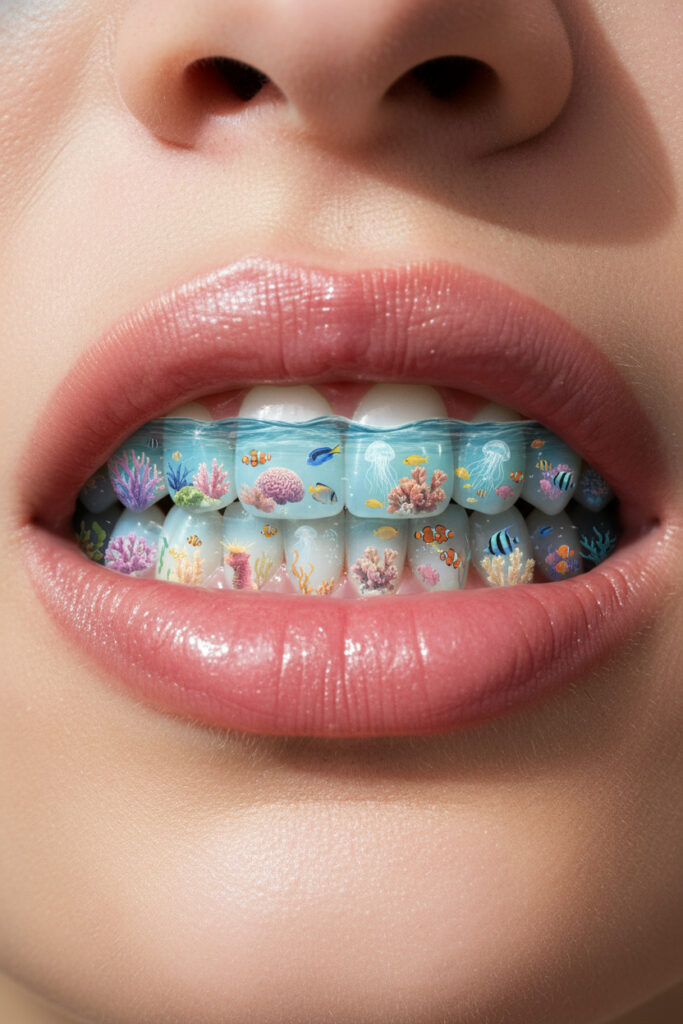
- Bizarre Surrealism: “A vertical, ultra-realistic close-up photo of a human mouth with teeth that resemble a miniature transparent aquarium. Inside each tooth is a tiny ocean with coral and fish swimming. Some teeth show gentle sea ripples, others fish and jellyfish and flowers. The gums are natural pink, and the lips are glossy with a wet texture, reflecting soft sunlight. The overall tone is surreal but photorealistic, blending marine fantasy with hyper-detailed dental aesthetics.”
Narrative and Storytelling Through Single Images
Even a single image can convey a powerful narrative or evoke a strong emotion, encouraging viewers to ponder and engage with your content.
Definition: Narrative in AI art refers to creating images that imply a story, a moment in time, or a sequence of events, inviting the viewer to imagine what happened before or what will happen next. Storytelling through single images focuses on suggesting a deeper meaning or context.
Why it matters: Humans are naturally drawn to stories. Images that hint at a narrative or evoke strong emotions (like mystery, joy, sadness, wonder) create a deeper connection with the audience, leading to increased comments and shares as people try to interpret or relate to the implied story.
How to do it: Use prompts that include elements suggesting action, emotion, or a specific setting with an implied past or future. Focus on evocative descriptors rather than just static ones.
Real-world examples:
- Mystery/Intrigue: “A cloaked figure standing on a deserted cobblestone street under a full moon, a single flickering gas lamp, film noir style, dramatic shadows, mysterious, 35mm film grain.”

- Wonder/Awe: “A young astronaut gazing at a vibrant nebula from the window of their spaceship, reflections of stars in their helmet visor, awe-inspiring, cosmic dust, photorealistic, 16K.”

- Emotional Resonance: “A weathered old man sitting alone on a park bench, looking at a faded photograph, autumn leaves falling, soft melancholic lighting, realistic oil painting, emotional depth.”

Interactive and Shareable Content
Content designed for interaction actively encourages comments, shares, and saves, which are powerful signals for social media algorithms.
Definition: Interactive content prompts viewers to act beyond just liking. This can involve questions, choices, or challenges embedded within the visual or implied by it. Shareable content often offers value, entertainment, or a strong emotional trigger that makes people want to show it to others.
Why it matters: Social media algorithms heavily favor content that generates comments, saves, and shares. These actions indicate high interest and relevance, pushing your content to a larger audience.
How to do it:
- Create variations of an image and ask your audience to pick a favorite.
- Generate images with a subtle detail or “easter egg” and challenge people to find it.
- Use imagery that naturally sparks discussion or debate.
- Design visuals that are easily relatable or aspirational, making them prime for sharing.
Real-world examples:
- “Pick your favorite” carousel: Generate 4-6 similar images with slight variations (e.g., “A fantastical coffee shop interior, cozy ambiance, different magical creatures as baristas in each image: 1) a grumpy goblin, 2) a whimsical fairy, 3) a silent wizard, 4) a cheerful dragon. Cinematic lighting, highly detailed, whimsical art style. –ar 1:1”). Post them as a carousel and ask, “Which barista would you pick for your morning coffee?”
- “Spot the difference”: Create two almost identical images with one or two subtle changes, then ask viewers to find them. (Requires careful prompt engineering and possibly minor post-editing).
- Relatable meme-style art: “A frustrated human struggling with a tangled charging cable, surrounded by perfectly organized AI robots effortlessly managing their tasks. Humorous, cartoon style.” This taps into common frustrations and is highly shareable.

Optimizing AI Art for Social Media Platforms
Creating stunning AI art is only half the battle; optimizing it for specific platforms ensures maximum impact and visibility. Each platform has its own best practices for aspect ratios, post-processing, and engagement strategies.
- Aspect Ratios:
- Instagram: For grid posts, 1:1 (square) is classic, but 4:5 (vertical portrait) often performs better as it takes up more screen real estate. For Reels and Stories, 9:16 (full vertical) is essential.
- TikTok: Primarily 9:16 (full vertical) for videos and images.
- Twitter/X: Supports a wider range, but 16:9 (horizontal landscape) or square often work well for images.
- How to: Most AI art generators allow you to specify the aspect ratio (e.g.,
--ar 1:1in Midjourney-like syntax, or selection within the UI of Leonardo AI/Stable Diffusion interfaces). Always generate your art in the native aspect ratio for your primary target platform.
- Post-processing tips: Even high-quality AI art can benefit from minor enhancements.
- Upscaling: If your generated image is low resolution, use free upscalers (many AI tools have this built-in, or use dedicated online upscalers) to improve clarity and detail, especially for intricate images.
- Minor edits: Adjust brightness, contrast, and color saturation in a photo editor to make your image pop. Remove any lingering imperfections or AI artifacts (e.g., strange details in backgrounds).
- Branding: Subtly add your logo or watermark if you wish to protect your work and build brand recognition.
- Captioning and Hashtag Strategies:
- Captions: Tell a story, ask a question, or provide context for your AI art. Engage your audience. For example, “I prompted AI to imagine [concept]. What do you think?”
- Hashtags: Use a mix of broad and niche-specific hashtags. Include
#AIArt,#GenerativeArt,#[YourStyle]AI,#InstagramAI,#TikTokAI, and trending hashtags relevant to your image’s content. Research popular hashtags using in-app tools or external services. - Call to Actions (CTAs): Encourage interaction. Ask questions, prompt users to tag a friend, or share their thoughts in the comments. “What should I prompt next?” or “Which version is your favorite?” are effective.
Expert Improvement Tips
Moving beyond basic prompting involves strategic approaches that significantly refine the quality and consistency of your AI art.
- Iterative Refinement and Seed Values: Instead of generating one image and moving on, embrace iterative refinement. Generate a batch of images, identify the best one, and use its “seed” value (if your tool provides it) to generate variations. Most platforms like Leonardo AI or Stable Diffusion interfaces allow you to use a seed to reproduce or build upon a specific generation. This allows for controlled experimentation and honing in on your vision. Change one element in your prompt at a time (e.g., a color, a camera distance, a pose) to understand its impact. blockquote
Pro Tip: Keep a “prompt journal.” Document your successful prompts, the tool used, key parameters, and the resulting images. This creates a valuable library of knowledge for future creations and helps you learn what works best for different styles. - Weighted Prompts (for compatible tools): Some advanced AI tools allow you to assign weights to different parts of your prompt (e.g., using
::in Midjourney or parentheses/brackets in Stable Diffusion). This tells the AI which concepts are more important than others, giving you precise control over the visual hierarchy.- Example (conceptual):
"A majestic lion::2 in a savanna::1, watercolor painting::1.5"This would emphasize the lion and the watercolor style more than the savanna.
- Example (conceptual):
- Prompt Chaining and Blending: This advanced technique involves taking elements or styles from multiple prompts or images and combining them. Some tools allow “image prompts” where you provide an image to influence the style or composition of a new generation. Others let you blend different textual concepts or even multiple images to create novel compositions. This is excellent for achieving complex, multi-layered visuals or maintaining stylistic consistency across a series.
- Leveraging Community Prompts and Remixing: Many AI art platforms have vibrant communities where users share their prompts and creations. Studying these can provide immense inspiration and insight into advanced techniques. Don’t simply copy; understand why a prompt works and then adapt it to your unique vision. Remixing existing successful concepts with your twist is a powerful way to generate viral content. blockquote
Warning: While exploring community prompts is educational, always aim for originality in your final output. Be mindful of ethical concerns around AI art, particularly regarding the training data and potential for bias or unintentional replication of existing art. - Focus on “Why” Not Just “What”: Instead of just describing what you want to see, try to describe why it should look that way. Convey emotion, intent, and atmosphere. For example, instead of “a forest,” try “a mystical forest shrouded in ancient secrets, the air thick with magic, creating a sense of wonder and slight unease.” This guides the AI towards the underlying feeling you want to evoke.
Conclusion
The ability to generate captivating, high-quality AI art for social media is no longer reserved for technical experts or those with large budgets. With the right prompting techniques and the wealth of free tools available, anyone can create visually striking content that has the potential to go viral on platforms like Instagram and TikTok.
I have outlined the critical components of a powerful AI art prompt, from defining clear subjects and styles to employing detailed modifiers and strategic negative prompts. We explored how free tools like Microsoft Copilot, Leonardo AI, OpenArt, and even Instagram’s built-in features can be leveraged to bring these prompts to life. Furthermore, I emphasized the importance of tailoring your content to viral niches, using narrative and aesthetic hooks, and optimizing your art for platform-specific requirements.
The journey from a simple idea to a viral image is an exciting one, driven by experimentation and a deep understanding of both AI capabilities and audience psychology. By consistently applying the strategies discussed—iterative refinement, strategic weighting, prompt chaining, and continuous learning from the community—you will not only fix common generation problems but also elevate your creations to an expert level. The creative potential of AI art is vast and continually expanding. I encourage you to embrace these tools, experiment boldly, and start crafting the next wave of viral social media content.
FAQ (Frequently Asked Questions)
Q1: What are the absolute best free AI art generators for beginners?
A1: For beginners, I recommend starting with Microsoft Copilot (Designer) and Leonardo AI. Microsoft Copilot is excellent for its natural language understanding and ease of use, making it straightforward to get good results with minimal effort. Leonardo AI offers a more comprehensive suite of tools and a generous free tier, allowing for more experimentation with different models once you get comfortable. Instagram’s built-in “Imagine” feature is also incredibly easy to use for quick, casual creations directly within the app.
Q2: How many words should an ideal AI art prompt be?
A2: There’s no fixed ideal length, but an effective prompt is typically descriptive yet concise. While simple prompts can yield variety, specific elements require detailed inclusion. Aim for clarity and focus on providing high-signal details. A good prompt often includes 4-6 key details covering medium, style, lighting, framing, mood, and color palette. Avoid overly long, complicated sentences that can confuse the AI.
Q3: Can I use AI-generated art for commercial purposes on social media?
A3: This is a complex area with evolving legal and ethical considerations. Copyright laws regarding AI-generated art are still being defined, and ownership can be ambiguous. Some platforms may offer commercial licenses with their paid tiers, while others, especially free tools, might have restrictions. It is crucial to check the specific terms of service and licensing agreements for each AI art generator you use. When in doubt, it is safer to use free AI art for personal projects or for content where monetization isn’t directly tied to the image’s copyright.
Q4: How do I make my AI art look less “AI-generated” or generic?
A4: To avoid a generic look, incorporate specific and unique details into your prompts. Focus on unusual combinations of subjects, distinct artistic styles (e.g., “expressionist painting by [specific artist]” instead of just “painting”), precise lighting conditions, and emotional descriptors. Heavy use of negative prompts to filter out common AI artifacts also helps. Experiment with different models within tools like Leonardo AI, as each has a unique aesthetic. Leveraging “prompt engineering” techniques, like descriptive language optimization and visual style implementation, is key.
Q5: What are common mistakes people make when writing AI art prompts?
A5: Common mistakes include being too vague (“create a cool picture”), not using negative prompts (leading to artifacts), using overly long or confusing sentences, expecting perfect results on the first try, and not specifying an artistic style. Another mistake is focusing only on the subject and forgetting to describe the environment, lighting, mood, or composition.
Q6: How can I ensure consistency in character or style across multiple AI art images?
A6: Achieving consistency can be challenging with free tools, but it’s possible.
- Use Seed Values: If a tool generates a character or style you like, try to use its “seed” value in subsequent prompts for variations.
- Detailed Character Description: Develop a very detailed prompt for your character, including specific features, clothing, and expressions, and use it consistently.
- Image Prompts/Reference Images: Some tools allow you to upload a reference image to guide new generations, helping maintain visual elements.
- Consistent Style Descriptors: Always include the same style references and modifiers in every prompt for that character or series.
Q7: How do I get my AI art to go viral on TikTok specifically?
A7: For TikTok, focus on dynamic visuals and engaging narratives suitable for short-form video.
- Aspect Ratio: Always generate in 9:16 vertical format.
- Visual Hooks: The first 3 seconds are critical. Use immediate motion or a strong visual reveal.
- Looping Content: Create seamless loops to increase watch time.
- Transitions & Story: Use AI images as impactful transitions in a video, telling a short story or demonstrating a concept.
- Relatability & Trends: Align your AI art with trending audio, challenges, or popular aesthetics on TikTok.
- Interactive Elements: Use polls, questions, or challenges within your video.
- Combine with human elements: Don’t replace your entire video with AI. Use AI to enhance and add an aesthetic touch.
Q8: Are there any ethical concerns I should be aware of when creating AI art?
A8: Yes, significant ethical concerns exist. These include:
- Copyright and Ownership: Questions arise about who owns AI-generated art, especially when trained on existing copyrighted works without artists’ consent.
- Bias: AI models can perpetuate biases present in their training data, leading to stereotypical or harmful representations.
- Devaluation of Human Art: Concerns that AI art might devalue the work and livelihood of human artists.
- Consent: Many artists are unaware their work has been used to train AI systems.
It is important to be aware of these issues and consider them in your creative process.
Q9: Can AI art generators create animations or videos for social media?
A9: While primarily image generators, some advanced AI tools and separate platforms are now offering AI video or animation capabilities. Some AI art tools can animate existing still images into GIFs, or provide image-to-video features where you can input an image and a prompt to generate a short clip. For dedicated AI video generation, you might need to explore more specialized tools, but the integration with image generators is growing.
Q10: What kind of prompts tend to get the most engagement or go viral?
A10: Prompts that lead to viral content often share several characteristics:
- Novelty & Surprise: Unexpected combinations or highly original concepts (e.g., “aquarium teeth”).
- High Aesthetic Appeal: Visually stunning, high-quality images with striking lighting, colors, or composition.
- Emotional Resonance: Images that evoke strong emotions like wonder, humor, nostalgia, or curiosity.
- Relatability: Content that viewers can personally connect with or understand easily.
- Trend Alignment: Images that tap into current social media trends, aesthetics, or pop culture references.
- Narrative Suggestion: Images that imply a story or spark a question in the viewer’s mind.