The quest for unique and compelling holiday visuals intensifies with each passing year. Static stock photos and repetitive designs struggle to capture attention in a content-saturated digital environment. For individuals and businesses aiming to produce distinctive Christmas imagery for 2025, relying solely on traditional photography can be time-consuming, expensive, and creatively restrictive. The challenge lies in generating high-quality, personalized, and imaginative holiday scenes without significant logistical overhead.
This article presents a comprehensive solution by leveraging the advanced image generation capabilities of Gemini AI. I will guide you through the process of crafting effective prompts that translate your creative vision into stunning Christmas-themed portraits and scenes. By understanding the nuances of AI prompting, you can overcome common artistic roadblocks and produce imagery that stands out. This guide provides the strategic framework and practical examples necessary to harness Gemini AI for your most impactful holiday visuals yet.
Structure Map
- The Power of Gemini AI for Holiday Imagery
- Core Elements of a High-Quality Gemini Christmas Prompt
- 10+ Viral Christmas Photo Prompt Categories and Examples
- 1. Classic Nostalgia
- 2. Whimsical Winter Wonderland
- 3. Modern Festive Elegance
- 4. Family & Pet Holiday Moments
- 5. Fantasy & Magical Scenes
- 6. Food & Drink Celebration
- 7. Global Holiday Traditions
- 8. Storybook & Animated Styles
- 9. Retro & Vintage Charm
- 10. Abstract & Artistic Interpretations
- 11. Custom Characters & Scenarios
- Iterative Prompting: Refining Your Gemini Creations
- Common Prompting Pitfalls and How to Rectify Them
- Expert Improvement Tips for Gemini AI Photo Prompts
- Conclusion
- Frequently Asked Questions (FAQ)
The Power of Gemini AI for Holiday Imagery
Gemini AI, with its advanced multimodal capabilities, offers a distinct advantage in generating high-quality visual content. Unlike earlier AI models, Gemini can process and understand complex instructions, leading to more coherent and contextually relevant image outputs. For holiday-themed creations, this means the ability to produce everything from hyper-realistic festive portraits to stylized whimsical scenes, all from textual descriptions.
Why it matters: The ability to rapidly generate diverse holiday imagery, customized to specific themes, moods, and aesthetics, saves significant time and resources compared to traditional photography or graphic design. It allows for creative exploration without limitations, enabling individuals to conceptualize and visualize unique Christmas visions that might otherwise be impossible or too costly to produce.
How to utilize it: Access Gemini through its integrated platforms (like Google Bard or specific image generation interfaces). Begin by formulating a detailed prompt that articulates your desired image. The quality of your output directly correlates with the precision and descriptiveness of your input prompt.
Core Elements of a High-Quality Gemini Christmas Prompt
Creating compelling AI-generated images requires a structured approach to prompt writing. Think of your prompt as a detailed script for Gemini AI. Each element you include adds a layer of instruction, guiding the AI toward your intended outcome. Neglecting any of these core components can result in generic or inconsistent images.
Subject and Action
Definition: This specifies who or what is in the image and what they are doing. It’s the central focus of your scene.
Why it matters: Clearly defining your subject and their actions prevents the AI from generating ambiguous or irrelevant figures. It establishes the narrative core of your image.
How to do it: Be precise. Instead of “a person,” specify “an elderly woman with kind eyes.” Instead of “Christmas,” describe “a child excitedly opening a brightly wrapped present.”
Real-world example:
- Vague: “Christmas photo with people.”
- Effective: “A joyful family of four, parents holding hands and smiling, two young children laughing while sitting on a plush rug in front of a twinkling Christmas tree.”
Pro Tip: Consider the emotional state and age of your subjects. Adding descriptors like “radiant with joy,” “peaceful,” or “mischievous” significantly influences the facial expressions and body language generated by the AI.
Environment and Setting
Definition: This describes the location and immediate surroundings where the subject is situated.
Why it matters: The environment sets the scene and mood. A well-described setting adds context, realism, and a sense of place to your image.
How to do it: Include details about indoor or outdoor settings, specific features, time of day, and ambient conditions.
Real-world example:
- Vague: “Christmas photo outside.”
- Effective: “An idyllic snow-covered village square at dusk, adorned with warm string lights and a large, decorated fir tree, with a light snowfall gently descending.”
Lighting and Atmosphere
Definition: This refers to the quality and direction of light, as well as the overall mood or emotional tone of the image.
Why it matters: Lighting is crucial for depth, realism, and conveying emotion. Atmosphere ties all elements together into a cohesive visual narrative.
How to do it: Use descriptive terms for lighting (e.g., “warm golden hour,” “soft diffused light,” “dramatic chiaroscuro,” “sparkling fairy lights”). For atmosphere, consider words like “cozy,” “magical,” “serene,” “vibrant,” or “melancholy.”
Real-world example:
- Vague: “Bright Christmas photo.”
- Effective: “Cozy, warm glow from a crackling fireplace, casting soft shadows across the room, with the soft, ethereal light from a snow-covered window providing a counterpoint, creating a peaceful and inviting atmosphere.”
Art Style and Aesthetics
Definition: This dictates the visual language of the image, ranging from photographic realism to various artistic interpretations.
Why it matters: Specifying an art style ensures the AI generates an image consistent with your desired aesthetic, whether it’s a photorealistic portrait or a whimsical illustration.
How to do it: Name specific artistic movements, styles, or visual qualities. Examples include “photorealistic,” “cinematic,” “watercolor painting,” “oil on canvas,” “storybook illustration,” “pixel art,” “bokeh effect,” or “minimalist design.”
Real-world example:
- Vague: “Nice Christmas picture.”
- Effective: “A whimsical digital painting, in the style of a classic children’s storybook illustrator, with soft brushstrokes and vibrant, saturated colors.”
Technical Specifications and Ratios
Definition: These are instructions related to camera angles, shot types, color palettes, and aspect ratios.
Why it matters: Technical specifications refine the composition and presentation of the image, making it suitable for specific uses (e.g., social media, print).
How to do it: Include terms like “wide-angle shot,” “close-up portrait,” “low-angle,” “high-angle,” “macro,” “cinematic depth of field,” “vibrant color palette,” “monochromatic,” “4K resolution,” or “aspect ratio 16:9.”
Real-world example:
- Vague: “Horizontal Christmas image.”
- Effective: “A detailed, high-resolution portrait, captured with a shallow depth of field, vibrant color saturation, in a 3:2 aspect ratio, perfect for a magazine cover.”
Warning: Be mindful of over-specification. While detail is good, too many contradictory instructions can confuse the AI and lead to unexpected results. Focus on the most critical elements first.
10+ Viral Christmas Photo Prompt Categories and Examples
Here, I present a selection of highly effective prompt categories designed to generate stunning Christmas visuals with Gemini AI. Each example includes a detailed prompt and a brief explanation of its intended effect.
1. Classic Nostalgia
Goal: Evoke a warm, traditional, and timeless Christmas feeling, reminiscent of holiday cards from past eras.
Prompt Example:
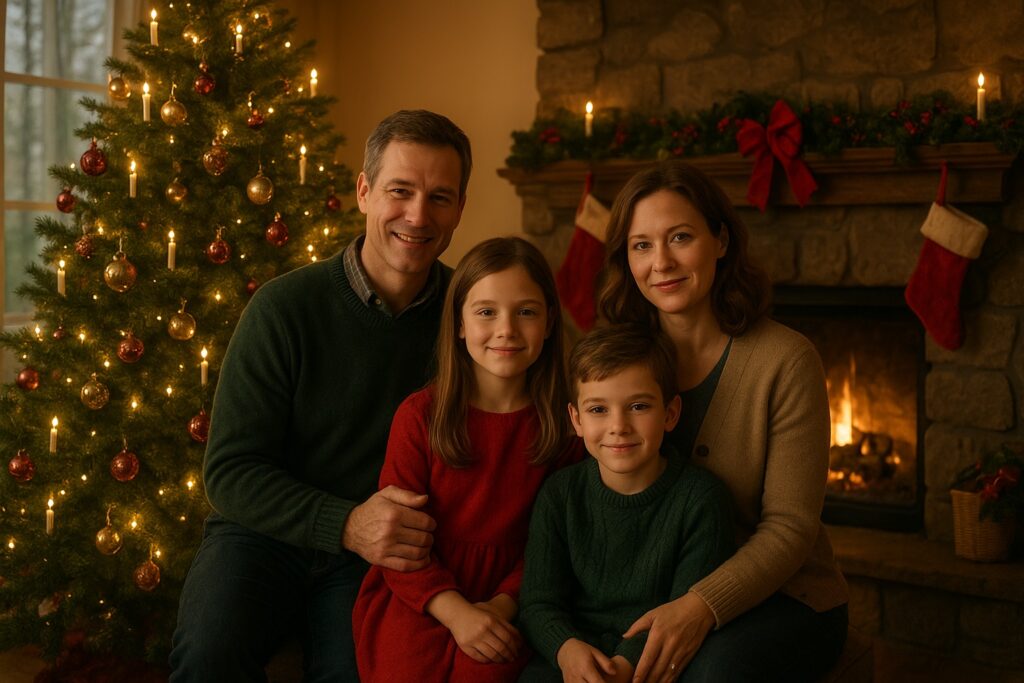
“A photorealistic portrait of a Caucasian family of four – parents in their 40s, two children aged 8 and 10 – gathered around a beautifully decorated vintage Christmas tree with flickering candle lights and classic ornaments. The scene is set in a cozy living room with a stone fireplace, adorned with garlands and stockings. Warm, soft, golden hour lighting filters through large windows, creating a nostalgic and inviting atmosphere. Shot with a shallow depth of field, 1950s aesthetic, rich reds and forest greens dominating the color palette, 4K, 3:2 aspect ratio.”
Explanation: This prompt specifies subject, action, a detailed vintage setting, warm lighting, photorealistic style with a 1950s aesthetic, and technical details for a classic, heartwarming feel.
2. Whimsical Winter Wonderland
Goal: Create magical, imaginative scenes often featuring fantastical elements, deep snow, and sparkling effects.
Prompt Example:
“A whimsical digital painting of a tiny, smiling gnome wearing a red pointy hat, riding on the back of a friendly reindeer through a shimmering, enchanted snow forest. The trees are covered in thick, glittering snow, and glowing fairy lights twinkle among the branches. A full moon casts an ethereal, soft blue light over the scene. The style is reminiscent of storybook illustrations, with soft, rounded shapes and an exaggerated sense of wonder. High detail, vibrant blues and whites, 16:9 aspect ratio.”
Explanation: Focuses on fantastical subjects, an enchanted setting, ethereal lighting, and a distinct whimsical, storybook art style.

3. Modern Festive Elegance
Goal: Generate sophisticated, minimalist, and stylish Christmas visuals with clean lines and contemporary aesthetics.
Prompt Example:
“A high-fashion, studio-quality portrait of a stylish woman in her 30s, wearing a chic, minimalist emerald green gown, standing next to a sleek, abstract white Christmas tree adorned with subtle gold accents. The background is a clean, muted grey wall. Soft, professional studio lighting creates subtle shadows and highlights. The aesthetic is clean, sophisticated, and modern, with a focus on elegant composition. Sharp focus, professional photography style, 4K, 2:3 aspect ratio.”
Explanation: Emphasizes a sophisticated subject, minimalist setting, professional lighting, and a modern, high-fashion photographic style.

4. Family & Pet Holiday Moments
Goal: Capture candid, heartwarming interactions between families and their beloved pets during the holidays.
Prompt Example:
“A heartwarming, candid photograph of a golden retriever wearing a small Santa hat, playfully trying to chew on a string of popcorn garland while a laughing young child (age 6) gently tries to redirect him. They are sitting on a plush, cream-colored rug in a brightly lit living room, with a decorated Christmas tree slightly out of focus in the background. Natural, joyful lighting, warm color tones, shallow depth of field, high-resolution, spontaneous moment, 4:3 aspect ratio.”
Explanation: Focuses on specific subjects (child, dog), an action, a cozy setting, natural lighting, and a candid photographic style to capture a genuine moment.

5. Fantasy & Magical Scenes
Goal: Imagine Christmas scenarios with elements of epic fantasy, mythical creatures, or otherworldly beauty.
Prompt Example:
“A breathtaking, epic fantasy digital painting of Santa Claus as a majestic, armored warrior, riding a flying, ice-maned pegasus through a starry winter sky over a snow-capped mountain range. He carries a glowing staff, illuminating the path. The sky is filled with a vibrant aurora borealis. Dramatic, chiaroscuro lighting, highly detailed, oil painting style with a touch of magic realism. Focus on dynamic composition, 8K, 16:9 aspect ratio.”
Explanation: Leverages mythical subjects, a fantastical setting, dramatic lighting, and an epic fantasy painting style.
6. Food & Drink Celebration
Goal: Create mouth-watering visuals of holiday treats, festive beverages, and celebratory spreads.
Prompt Example:
“A high-resolution, professional food photography shot of a perfectly frosted gingerbread house, intricately decorated with candy canes, gumdrops, and royal icing. It sits on a wooden table, surrounded by steaming mugs of hot cocoa topped with whipped cream and miniature marshmallows, alongside a scattering of pinecones and frosted cranberries. Soft, overhead studio lighting highlights the textures. Warm, inviting color palette, bokeh background, macro details, 4K, 1:1 aspect ratio (square).”
Explanation: Explicitly describes food subjects, a festive setting, studio lighting, professional food photography style, and close-up technical details.
7. Global Holiday Traditions
Goal: Showcase diverse cultural celebrations and interpretations of the holiday season from around the world.
Prompt Example:
“A vibrant and culturally rich photograph of a family celebrating Nochebuena in a traditional Mexican home. An abuela (grandmother) is lovingly serving tamales from a large pot, surrounded by smiling children and adults. The room is decorated with colorful papel picado, twinkling lights, and a small, festive altar. Warm, inviting lamplight and a joyous, communal atmosphere. Documentary photography style, rich textures, diverse skin tones, 4K, 3:2 aspect ratio.”
Explanation: Specifies a cultural celebration, specific subjects and actions, traditional decorations, warm lighting, and a documentary photography style for authenticity.
8. Storybook & Animated Styles
Goal: Produce images that look like they’ve jumped out of a children’s book or an animated film.
Prompt Example:
“A charming, hand-drawn animation still of a chubby, happy snowman wearing a plaid scarf and top hat, joyfully singing Christmas carols with a flock of friendly, bluebirds perched on his arms. They are in a snowy forest clearing, with large, soft snowflakes falling gently. Bright, cheerful colors, clean lines, and a classic 2D animation aesthetic, reminiscent of vintage holiday cartoons. High resolution, cartoon style, 16:9 aspect ratio.”
Explanation: Clearly defines animated subjects, a snowy setting, cheerful colors, and a specific 2D animation aesthetic.
9. Retro & Vintage Charm
Goal: Recreate the aesthetic of past decades, from mid-century modern to 80s kitsch, with a Christmas twist.
Prompt Example:
“A stylized, grainy photograph reminiscent of the 1970s, featuring a diverse group of friends in bell bottoms and turtleneck sweaters, laughing around a gaudy tinsel-covered aluminum Christmas tree in a retro living room. The room features orange and brown decor, shag carpet, and a rotary phone. Warm, slightly desaturated color palette, flash photography effect, film grain texture, candid, vintage aesthetic, 4K, 4:3 aspect ratio.”
Explanation: Specifies a particular decade, clothing, decor, film grain effect, desaturated colors, and a vintage photographic style.
10. Abstract & Artistic Interpretations
Goal: Explore non-literal, conceptual, and artistic representations of Christmas themes.
Prompt Example:
“An abstract, minimalist digital art piece representing the spirit of Christmas. Focus on flowing lines and geometric shapes, primarily in deep blues, silvers, and hints of shimmering gold. The composition should suggest interconnectedness, light, and quiet reflection, without explicit holiday symbols. Smooth gradients, clean vector art style, high contrast, elegant and sophisticated. 8K, 1:1 aspect ratio.”
Explanation: Directs the AI toward abstract art, specifying colors, shapes, underlying themes, and a minimalist digital art style.
11. Custom Characters & Scenarios
Goal: Create unique characters or blend existing elements in novel ways for personalized narratives.
Prompt Example:
“A vibrant, expressive anime-style illustration of a cheerful space alien, with large, sparkling eyes and iridescent green skin, wearing a futuristic Santa suit. The alien is distributing glowing, crystalline presents to small, adorable robotic elves on a snow-covered lunar landscape, with Earth visible in the background. Neon lights and stardust fill the scene. Dynamic lighting, bold outlines, vibrant sci-fi color palette, high detail, 8K, 16:9 aspect ratio.”
Explanation: Introduces a custom, imaginative character (space alien Santa), a unique setting, and specific artistic styles (anime, sci-fi) with dynamic elements.
Iterative Prompting: Refining Your Gemini Creations
The first prompt you write is rarely the final one. Iterative prompting is the process of generating an image, reviewing it, and then modifying your prompt based on the results to achieve a closer match to your vision. This is a fundamental technique for mastering AI image generation.
Why it matters: AI models are powerful but not mind-readers. They interpret your words. Iteration allows you to bridge the gap between your conceptual idea and the AI’s interpretation, refining details, correcting errors, and exploring variations that you might not have considered initially.
How to do it (Step-by-Step):
- Start Broad: Begin with a prompt that covers the main subject, setting, and desired mood.
- Example Initial Prompt: “A person celebrating Christmas.”
- Generate and Review: Submit the prompt and analyze the output.
- Critique: Is the person male or female? What are they doing? What’s the background? It’s too generic.
- Add Specificity: Identify missing details and add them to your prompt.
- Refined Prompt: “A young woman smiling, holding a wrapped gift in front of a decorated Christmas tree.”
- Generate and Review Again: Evaluate the new output.
- Critique: The woman looks a bit stiff, and the tree isn’t very festive. The lighting is flat.
- Introduce Style and Ambiance: Incorporate artistic elements, lighting, and atmosphere descriptors.
- Refined Prompt: “A joyful young woman with warm eyes, gently holding a red wrapped gift, smiling towards the viewer. She stands in front of a traditional Christmas tree adorned with twinkling warm lights and vintage glass ornaments. Soft, cozy fireplace glow illuminates the scene, cinematic photography style, shallow depth of field, natural skin tones.”
- Fine-Tune and Experiment: Continue to adjust words, add negative prompts (e.g., “no blurry background”), or try synonyms to achieve desired effects. Experiment with changing the order of descriptors, as sometimes the AI prioritizes terms at the beginning of a prompt.
Real-world example of iteration:
- Prompt 1 (Too Simple): “Christmas dog.”
- Result: Generic dog, possibly with a Santa hat.
- Prompt 2 (Adding Detail): “A golden retriever puppy wearing a small red Santa hat, sitting next to a Christmas tree.”
- Result: Better, but the lighting is dull, and the tree is basic.
- Prompt 3 (Adding Lighting, Style, and Emotion): “A adorable golden retriever puppy wearing a small, slightly crooked red Santa hat, looking directly at the camera with wide, curious eyes. It’s sitting on a soft, fluffy white rug next to a magnificently decorated Christmas tree, sparkling with warm string lights and reflective silver ornaments. Cozy, soft diffused lighting from nearby window. High-resolution, photorealistic, shallow depth of field, warm inviting tones, 4K, 1:1 aspect ratio.”
- Result: A much more detailed, atmospheric, and professional-looking image of a festive puppy.
Common Prompting Pitfalls and How to Rectify Them
Even experienced users encounter challenges. Understanding common issues can help you troubleshoot your prompts effectively.
- Vague Descriptions:
- Problem: “Christmas scene” or “Holiday image.” The AI has too much freedom and produces generic, uninspired results.
- Rectification: Be exceedingly specific. Describe the subject, their action, the setting, lighting, mood, and art style in detail.
- Example Fix: Instead of “Christmas scene,” try “A bustling Victorian Christmas market at night, illuminated by gas lamps and snow falling gently, with vendors selling roasted chestnuts and carolers singing.”
- Contradictory Instructions:
- Problem: “A dark, moody image with bright, cheerful colors.” The AI struggles to reconcile opposing directives.
- Rectification: Ensure consistency in your descriptions. If you want a specific mood, all elements (lighting, colors, subject expressions) should support it.
- Example Fix: Choose either “dark, moody image with muted tones” or “bright, cheerful image with vibrant colors.”
- Over-prompting (Too Much Redundancy):
- Problem: Repeating terms unnecessarily or including too many modifiers that don’t add new information. “A very, very festive and cheerful Christmas party, with lots of happy people enjoying the party.”
- Rectification: Be concise and impactful. Every word should contribute meaningfully. Trust the AI to understand concepts.
- Example Fix: “A vibrant and cheerful Christmas party, guests laughing and conversing amidst twinkling lights.”
- Lack of Negative Prompts:
- Problem: Getting unwanted elements or artifacts in your image, e.g., blurry faces, distorted hands, text, watermarks.
- Rectification: Use negative prompts to explicitly tell the AI what not to include. Most Gemini interfaces support this.
- Example Fix: Add “negative prompt: blurry, distorted, text, watermark, ugly, poor quality, bad anatomy, extra limbs, bad lighting, low resolution.”
- Ignoring Aspect Ratios:
- Problem: Generating images in the default square ratio when you need a horizontal or vertical image, leading to cropping issues or awkward compositions.
- Rectification: Always specify your desired aspect ratio (e.g.,
16:9,9:16,3:2,4:3,1:1). - Example Fix: Ensure
aspect ratio 16:9orlandscape formatis included if you want a widescreen image.
Expert Improvement Tips for Gemini AI Photo Prompts
Moving beyond basic prompting involves leveraging advanced techniques to consistently produce superior results.
- Embrace Specific Artists/Photographers for Style:
- When you desire a particular aesthetic, naming a renowned artist, photographer, or even an art movement can profoundly influence the AI’s output. Gemini has been trained on vast datasets of visual information and can often emulate stylistic traits.
- How to do it: Append “in the style of [Artist’s Name]” or “photography by [Photographer’s Name]” to your prompt.
- Example: “…cinematic depth of field, vibrant color palette, in the style of [Norman Rockwell] for a nostalgic feel” or “…sharp focus, professional portrait photography, by [Annie Leibovitz].”
- Utilize Lighting Modifiers for Professionalism:
- Beyond “warm light” or “bright,” specific photographic lighting terms can dramatically enhance the mood and quality of your image, making it appear professionally shot.
- How to do it: Incorporate terms like “rim lighting,” “volumetric lighting,” “studio strobes,” “softbox lighting,” “backlight,” “god rays,” “cinematic lighting,” or “golden hour.”
- Example: “A child’s face lit by warm, softbox lighting, with subtle rim lighting outlining their hair, creating a halo effect, as they gaze at Christmas ornaments.”
- Experiment with Negative Prompts for Precision Control:
- Don’t just use generic negative prompts. Tailor them to specific issues you observe in your generated images. If faces look odd, add
ugly faceordeformed facial features. If details are blurry, addout of focus details. - How to do it: Analyze recurrent flaws in your outputs and add those specific descriptors to your negative prompt list.
- Example: If your holiday food shots always have a messy background:
negative prompt: messy background, cluttered, blurry, out of focus.
- Don’t just use generic negative prompts. Tailor them to specific issues you observe in your generated images. If faces look odd, add
- Layer Textures and Materiality:
- To add realism and richness, describe the textures and materials of objects and clothing in your scene. This adds a tactile dimension to the visual.
- How to do it: Use adjectives like “velvet,” “knitted wool,” “sparkling glitter,” “glossy ceramic,” “rough wood grain,” “frosted glass,” “silken ribbon,” “fluffy snow.”
- Example: “A close-up of a steaming mug of hot cocoa, with a knitted wool cozy, resting on a rough-hewn wooden table, beside a frosted windowpane, catching the light on shimmering snowflakes.”
- Specify Camera Lenses and Angles:
- Simulating real-world photography equipment and techniques can add significant depth and dynamic composition to your AI images.
- How to do it: Use terms like “shot with a 50mm lens,” “wide-angle perspective,” “telephoto compression,” “macro lens detail,” “dutch angle,” “bird’s-eye view,” or “worm’s-eye view.”
- Example: “A low-angle, wide-angle shot of a towering, intricately decorated Christmas tree, with presents spilling out from beneath, captured with a 24mm lens to emphasize its grandeur.”
Conclusion
Mastering Gemini AI for Christmas photo generation transforms your creative potential, allowing you to produce a vast array of unique and stunning holiday visuals for 2025. By meticulously detailing your subjects, settings, lighting, art styles, and technical specifications, you guide the AI to realize your vision with remarkable precision. The iterative prompting process, coupled with an understanding of common pitfalls and expert-level refinement techniques, ensures that your creations are not merely AI-generated, but truly bespoke and impactful.
The prompts and strategies I have outlined provide a robust framework for everything from classic nostalgic scenes to fantastical holiday dreamscapes. The ability to articulate your creative desires with such specificity empowers you to craft visuals that resonate, eliminating the constraints of traditional methods. Embrace Gemini AI as a powerful tool in your creative arsenal, and watch as your most imaginative Christmas concepts come to life with unparalleled quality and originality.
Frequently Asked Questions (FAQ)
Q1: What is Gemini AI, and how does it generate images?
A1: Gemini AI is a multimodal AI model developed by Google that can understand and generate various types of information, including text, code, audio, and images. When generating images, you provide a text prompt (a description of what you want to see), and Gemini uses its sophisticated deep learning algorithms, trained on vast datasets of images and their descriptions, to construct a visual representation that matches your text input.
Q2: Do I need special software to use Gemini AI for image generation?
A2: Typically, you will access Gemini’s image generation capabilities through an integrated platform, such as Google Bard or specific AI art generation tools provided by Google. You usually don’t need to install dedicated software; it’s often web-based. Always check the official Google resources for the most current access methods.
Q3: How important is prompt length for Gemini AI?
A3: Prompt length is less important than prompt quality and specificity. A short, highly descriptive prompt can be more effective than a long, vague one. Focus on including all necessary details (subject, action, setting, lighting, style, technicals) concisely, avoiding unnecessary repetition. Long prompts that are well-structured and detailed often yield excellent results.
Q4: Can I use real photos as input for Gemini AI to generate new Christmas images?
A4: Yes, some advanced versions or specific interfaces of Gemini AI allow for image-to-image prompting, where you can upload an existing image and describe how you want it to be transformed or used as a stylistic reference. This is a powerful technique for maintaining consistency or generating variations based on an initial visual. Always check the specific Gemini interface you are using for this feature.
Q5: What if Gemini AI generates images that are not quite right?
A5: This is a common experience and highlights the importance of iterative prompting. Review the generated image, identify what’s wrong, and modify your prompt. This might involve adding more detail, using negative prompts to exclude unwanted elements, adjusting stylistic keywords, or experimenting with different phrasing. It’s a process of refinement.
Q6: Are there any ethical considerations when using Gemini AI for image generation?
A6: Yes, ethical considerations are crucial. Avoid generating images that are harmful, discriminatory, promote violence, or infringe on copyrighted material. Be mindful of bias in AI outputs and ensure your prompts contribute to positive and inclusive content. Google has guidelines for responsible AI use, which you should always review.
Q7: How can I ensure my Christmas photos look unique and not generic?
A7: To avoid generic results, focus on unique combinations of elements. Instead of just “Santa Claus,” describe “Santa Claus as a retro-futuristic astronaut delivering gifts on a moon base.” Specify unique art styles, unconventional lighting, or unexpected juxtapositions. The more creative and detailed your prompt, the less generic the outcome will be.
Q8: Can Gemini AI generate images of specific individuals or copyrighted characters?
A8: AI models generally have safeguards to prevent the generation of recognizable individuals (without their consent) or copyrighted characters to avoid legal and ethical issues. While you can describe generic characters (e.g., “a wizard”), direct requests for specific famous people or characters from popular media may be blocked or result in generic interpretations.
Q9: What aspect ratios are generally recommended for Christmas photo prompts?
A9:
- 1:1 (Square): Ideal for social media profile pictures or Instagram feeds.
- 3:2 or 4:3: Standard photographic ratios, versatile for many uses.
- 16:9 (Landscape): Best for banners, desktop wallpapers, or cinematic scenes.
- 9:16 (Portrait): Perfect for smartphone screens, stories, or vertical posters.
Choose the ratio that best suits where your final image will be displayed.
Q10: Can I specify emotions in my prompts for subjects?
A10: Absolutely, and it’s highly recommended! Describing emotions (e.g., “joyful,” “serene,” “curious,” “mischievous,” “awe-struck”) helps the AI generate more expressive facial features and body language, adding depth and personality to your subjects. Use strong, evocative adjectives to convey the desired emotional state.